Unordered HTML list: starts with <ul> tag and each item in the list start with <li> tag and, items are marked with bullets (small black dots)
Example:
<ul>
  <li>Morning</li>
  <li>Noon</li>
  <li>Evening</li>
</ul>
you can select list style
Disc:
<ul style="list-style-type:disc;">
  <li>Morning</li>
  <li>Noon</li>
  <li>Evening</li>
</ul>
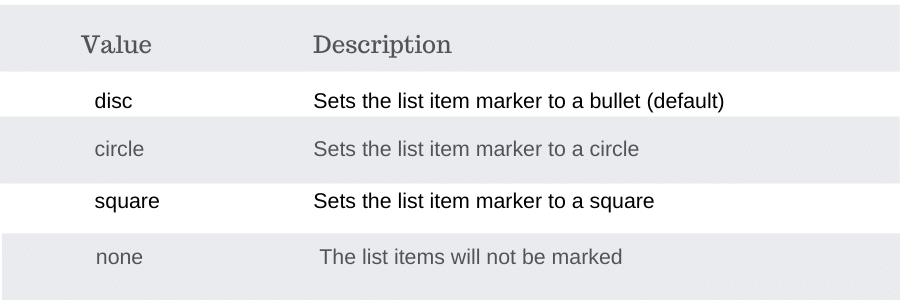
Circle:
<ul style="list-style-type:circle;">
  <li>Morning</li>
  <li>Noon</li>
  <li>Evening</li>
</ul>
Square:
<ul style="list-style-type:square;">
  <li>Morning</li>
  <li>Noon</li>
  <li>Evening</li>
</ul>
none:
<ul style="list-style-type:none;">
  <li>Morning</li>
  <li>Noon</li>
  <li>Evening</li>
</ul>
Ordered HTML List – The Type Attribute: The type an attribute of the <ol>the tag defines the type of the list item marker.
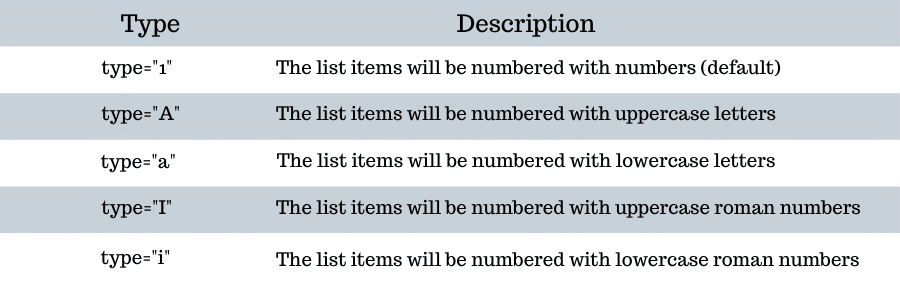
Numbers:
<ol type="1">
  <li>Morning</li>
  <li>Noon</li>
  <li>Evening</li>
</ol>
Uppercase Letters:
<ol type="A">
  <li>Morning</li>
  <li>Noon</li>
  <li>Evening</li>
</ol>
Lowercase Letters:
<ol type="a">
  <li>Morning</li>
  <li>Noon</li>
  <li>Evening</li>
</ol>
Uppercase Roman:
<ol type="I">
  <li>Morning</li>
  <li>Noon</li>
  <li>Evening</li>
</ol>
Lowercase Roman:
<ol type="i">
  <li>Morning</li>
  <li>Noon</li>
  <li>Evening</li>
</ol>
HTML Description Lists is a list of terms, with a description of each term.
- <dl> tag defines the description list,
- <dt>tag defines the term (name), and the
- <dd>tag describes each term
<dl>
  <dt>Morning</dt>
  <dd>- Start of the day</dd>
  <dt>Evening</dt>
  <dd>- End of the day</dd>
</dl>
Nested Lists: the list under the other list and can be written as follows
<ul>
  <li>Day</li>
  <li>Morning
    <ul>
      <li>Breakfast</li>
      <li>Green tea</li>
    </ul>
  </li>
  <li>Noon</li>
</ul>
Control List Counting: By default, an ordered list will start counting from 1. If you want to start counting from a specified number, you can use the start attribute
<ol start="50">
  <li>Morning</li>
  <li>Noon</li>
  <li>Evening</li>
</ol>
Horizontal List with CSS: HTML lists can be styled in many different ways with CSS.
One popular way is to style a list horizontally, to create a navigation menu
<!DOCTYPE html>
<html>
<head>
<style>
ul {
  list-style-type: none;
  margin: 0;
  padding: 0;
  overflow: hidden;
  background-color: #333333;
}

li {
  float: left;
}

li a {
  display: block;
  color: white;
  text-align: center;
  padding: 16px;
  text-decoration: none;
}

li a:hover {
  background-color: #111111;
}
</style>
</head>
<body>

<ul>
  <li><a href="#home">Morning</a></li>
  <li><a href="#news">Noon</a></li>
  <li><a href="#contact">Evening</a></li>
  <li><a href="#about">Night</a></li>
</ul>

</body>
</html>
One thought on “HTML LISTS”
Comments are closed.